

A Comprehensive Overview of How To Do a Technical SEOAudit of a Website
It is important to understand what Google means by content. Often SEO professionals start to move to explain about written, image or video content. Actually, content is everything – from a blog article, to how the site is coded and performs. Technical SEO audits concentrate on ‘Web Performance’ and other ‘on-page’ factors that affect positively or negatively, your website from the viewpoint and subsequent rankings of the search engines. With the help of a good technical audit, you will be able to analyse how search engines such as Google crawl, index, and understand your website. Your website’s search ranking and visibility can be improved by identifying and fixing technical issues that are hindering its performance.
Performing a Technical SEO Audit Key Touch-points:
- Make sure your website can be crawled and indexed by search engines. To do this, you need to check for crawl errors, make sure that robots.txt is configured properly, and submit your sitemap appropriately. All of this is handled in Google Search Console and Bing Webmaster Tools.
- Prioritise Optimisation: By understanding which pages are indexed and which are not, you can prioritise optimisation efforts on the most valuable pages.
- Analysis of your website’s site architecture, including internal links and URL (Uniform Resource Locator) structure. Your pages should be arranged in a clear hierarchy so that search engines can understand the relationships between them.
- The optimisation of individual elements of a webpage, such as title tags, meta descriptions, header tags, and images, is known as on-page optimisation. This is why it is so important to ensure that these elements are informative and relevant to the reader.
- Check for broken links, redirects, mobile-friendliness, page speed, and structured data implementation in technical SEO. In order to rank well in search engines, it is important to consider these factors.
- Analysis of server log files provides valuable insights into crawl activity, errors, and potential problems. These logs can be analysed to uncover hidden problems.
- Analyse your Web Performance – Core Web Vitals. Most of this should be covered in the mobile friendliness analysis.
Checking The Basics in a Technical SEO Audit
Check for and Fix Robots.txt Issues
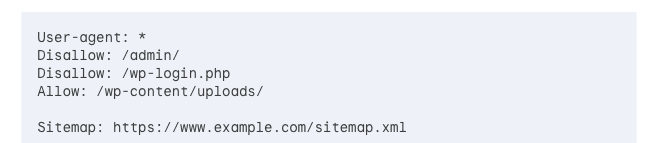
- Robots.txt: This file instructs search engines on which pages to crawl and index. Ensure it’s not accidentally blocking important pages. Use tools like Google Search Console’s robots.txt tester to verify its functionality.
- Review Directives: Check for typos or incorrect directives that might be unintentionally blocking crawlers.
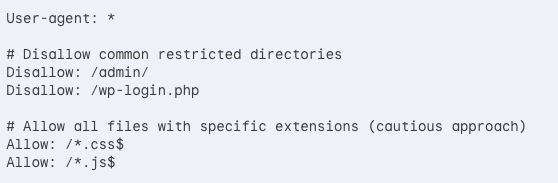
- Allow Essential Crawling: Make sure the robots.txt allows crawling of essential files like CSS, Javascript (if needed for rendering), and image files (with a crawl delay if necessary).
- I have written much more on the value to SEO and robots.txt on this site.
Fix Crawlability and Indexability Issues

- Crawl Errors: Use tools like Google Search Console or SEO crawler software to identify crawl errors. Fix these errors to ensure smooth crawling.
- Server errors, particularly those in the 5xx range, can have a significant impact on SEO. They can lead to a decrease in search engine visibility and rankings, as search engines may perceive a high number of server errors as a sign of website instability or poor quality.
- 500 (Internal Server Error) Errors: These errors indicate a problem with the server itself. They can lead to a decrease in search engine visibility and rankings if they are not addressed promptly, as search engines may interpret a high number of 500 errors as a sign of a poorly functioning website
- 503 (Service Unavailable) Errors: These errors occur when the server is temporarily unable to handle requests. They can negatively impact SEO if they are not properly handled, as search engines may perceive a high number of 503 errors as a sign of a poorly maintained or unreliable website.
- 404 (Not Found) Errors: These errors occur when a page is not found on the server. They can negatively affect SEO if they are not properly handled, as search engines may perceive a high number of 404 errors as a sign of a poorly maintained or outdated website
- Regularly Monitor Server Errors: Use tools like Google Search Console or SEO crawler software to identify and monitor server errors.
- Fix Errors Promptly: Address server errors as soon as they are identified to minimize their impact on SEO
- Use 301 Redirects: When redirecting URLs, use 301 redirects to pass link equity from the old URL to the new one
- Avoid 302 Redirects: 302 redirects do not pass link equity and can lead to confusion for search engines
- Handle Server Downtime Properly: If server downtime is necessary, serve a 503 response and limit the duration of the downtime to avoid negative SEO impacts.
- Keep Your Website Up-to-Date: Regularly update your website to ensure that it is functioning properly and that any potential server errors are addressed promptly.
Use the Index Coverage Report To Reveal A Lot of SEO Errors

- In Google Search Console, the Index Coverage report shows which pages are indexed and any errors preventing indexing. Address these issues (e.g., noindex tags blocking important pages). A healthy Index Coverage Report with minimal errors signifies smooth crawling and indexing by Google. Regularly monitoring this report allows you to identify and fix issues before they impact your website’s search ranking – I recommend at least twice a month per website. Use the report to identify orphaned pages (not linked to from anywhere on your site) and consider adding internal links to them. Leverage the report’s data to identify opportunities for content improvement based on which pages are indexed and which are not.
- Things to Watch Out for in the Index Coverage Report:
- Status Codes: Pay close attention to status codes like 404 (not found) or 5xx (server error) that prevent indexing. Fix these errors to ensure search engines can access your content.
- Valid with Warnings: Even pages marked “valid” might have warnings that could affect search performance. Address these warnings (e.g., mobile usability issues) for optimal SEO.
- Excluded Pages: The report shows pages excluded from indexing due to robots.txt directives or noindex tags. Ensure these exclusions are intentional and not accidental.
- Submitted vs. Discovered: The report allows you to see if submitted URLs (through your sitemap) actually got discovered by Google. Investigate discrepancies to ensure your sitemap is accurate.
- Crawl Anomaly: This flag indicates a sudden drop in crawl activity. Investigate the cause, such as server issues or robots.txt changes.
Spot and Fix XML Sitemap Issues
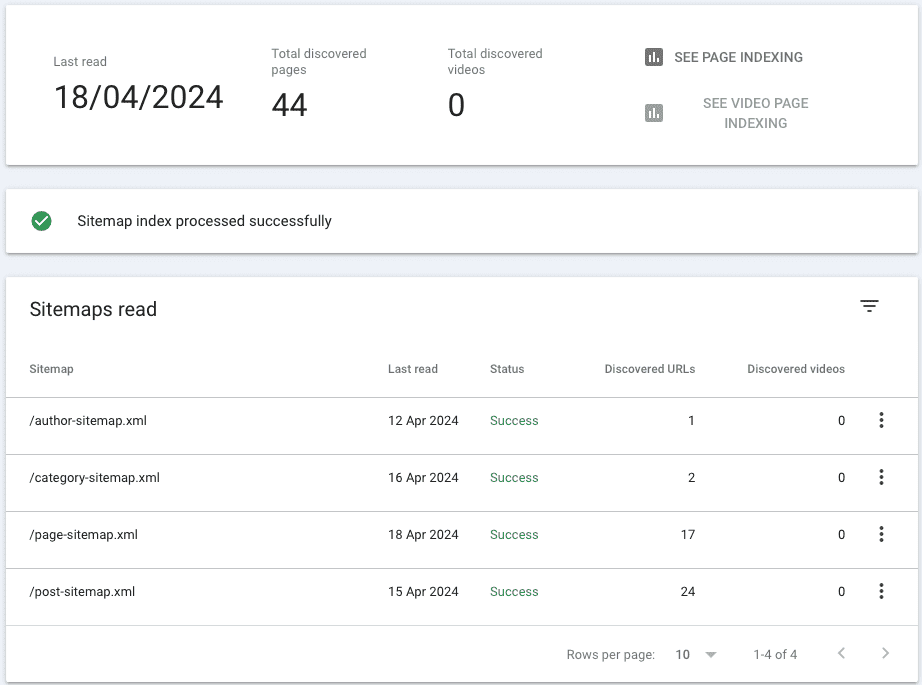
- Sitemap Existence: Verify that your website has an XML sitemap listing all important pages.
- Sitemap Accuracy: Make sure the sitemap is up-to-date and reflects any changes to your website structure or content.
- Sitemap Submission: Submit your sitemap to Google Search Console and other search engines (if applicable) to help them discover your pages efficiently. Make sure ONLY canonised, live and non-redirected pages are submitted in the sitemap. Ensure that any links on these pages to any pages you have asked robots.txt to disallow are not included – otherwise, these pages are likely to get indexed.
- Check for Common Issues: Common XML sitemap issues include listing ineligible URLs, such as 404 pages, duplicates, redirects, and pages blocked with a noindex rule or by robots.txt
- Validate the Sitemap: Use a sitemap validator tool to check for errors in the XML sitemap. Common errors include pages that search engines can’t crawl, 404 errors, 401 errors, too many URLs in the sitemap, and non-canonical URLs
- Fix Ineligible URLs: Remove ineligible URLs from the sitemap, such as 404 pages, duplicates, redirects, and pages blocked with a noindex rule or by robots.txt3.
- Update the Sitemap: If the sitemap is outdated or incorrect, update it to ensure it accurately reflects the current state of the website
- Check URL Formatting: Ensure that the URLs in the sitemap are using the correct protocol (HTTP or HTTPS) and include the correct domain (with or without “www”)
- Fix XML Declaration Errors: Ensure that the XML declaration is at the start of the sitemap file and that the sitemap is well-formed and valid
- Submit the Sitemap to Google Search Console: Once the sitemap is fixed, submit it to Google Search Console for processing
- Monitor and Maintain the Sitemap: Regularly check the sitemap for errors and update it as needed to ensure that it accurately reflects the website’s content
Technical SEO and Your URL Structure
A URL is the unique address that locates a specific web page or resource on the internet. It acts like a roadmap for search engines and users to find your content.
Here’s how a typical URL is structured:
- Protocol (e.g., https): Defines the communication method between browser and server (usually https for secure connections).
- Domain Name (e.g., [anthonyleaton.uk]): The unique identifier of your website.
- Subdirectory (e.g., /work-examples/): Categorises content within your website (optional).
- Slug (e.g., /technical-audit-seo/): The specific page name, descriptive and informative.
- Parameters (e.g., ?colour=brown): Used for dynamic content filtering (use cautiously for SEO – see duplicated content below).
Importance of URL Structure:
A well-defined URL structure offers numerous SEO and user experience benefits:
- Improved Search Engine Understanding: Clear URLs help search engines categorise your content and understand the hierarchy of your website.
- Enhanced User Experience: Descriptive URLs make it easier for users to understand the content of a page before clicking.
- Breadcrumbs: These visual navigation elements act like a breadcrumb trail, showing users their location within the website structure. This improves user experience and allows them to navigate back to previous sections easily.
Common URL Structure Problems:
- Dynamic URLs: Excessive use of parameters can create duplicate content issues.
- Unnecessary Subdirectories: Overly complex structures can confuse users and search engines.
- Missing Keywords: Descriptive keywords should be included in the slug for better searchability.
- Long and Unreadable URLs: Keep URLs concise while still being informative.
Building a Scalable URL Structure:
- Start Simple: Use a flat structure if your website has a limited amount of content.
- Categorise Logically: As your website grows, create categories and subcategories to group related content.
- Use Keywords Strategically: Include relevant keywords in your slugs while maintaining readability.
- Plan for Growth: Consider a structure that can accommodate future content expansion without becoming overly complex.
Benefits of Nice URLs:
- Social Media Sharing: Clear and descriptive URLs are more likely to be shared and clicked on social media platforms.
- Print Media: Easy-to-understand URLs are more likely to be included in print publications.
- Branding: URLs can reinforce your brand identity if they are consistent with your website’s overall theme.
Identify and Address Canonisation Issues
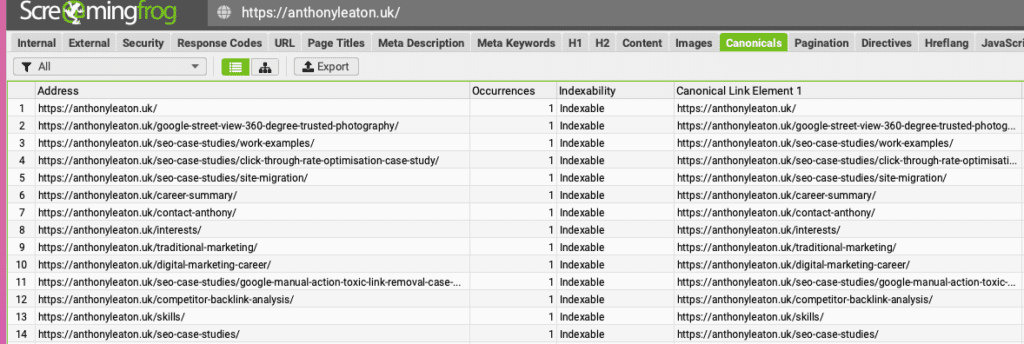
- Canonicalization: This refers to ensuring there’s only one “preferred” version of a page indexed by search engines, even if it’s accessible from multiple URLs.
- Identify Duplicates: Check for duplicate content using SEO tools or crawl data analysis. This could be caused by session IDs, printer-friendly versions, or paginated content.
- Implement Canonical Tags: Use the rel=”canonical” link tag to specify the preferred URL for a page with duplicate versions.
- How to Identify Canonicalisation Issues:
- In Screaming Frog, first make sure you have Google Search Console connected to the ScreamingFrog crawler. Once you have performed the audit, go to the “Canonicals” tab and apply the “Canonicalised” filter to view pages that have a canonical link pointing to a different URL.
- The “Missing” filter will show pages that are missing a canonical tag altogether
- Analyse the Canonicalisation Issues:
- Review the URLs flagged as having canonicalisation issues to understand why they are being canonicalised to a different URL
- Determine if the canonical is correct or if it should be pointing to a different URL. Checking ‘traffic’ to these pages will tell which page is likely higher ranking (with organic traffic) or has a lot of calls to action pointed to it. Ensure that the page getting the most traffic, is the most desired page for the purpose for which it was written.
- Fix Incorrect Canonicals:
- Update the canonical tags on pages where the canonical is pointing to the wrong URL
- Address Missing Canonicals:
- Add canonical tags to pages that are missing them to prevent potential duplicate content issues
- Update Internal Links:
- Update any internal links on your website to point to the canonical version of the page, rather than the non-canonical version
- Monitor and Maintain Canonicals:
- Regularly review your website’s canonicalisation using Screaming Frog to identify and fix any new issues that arise5.
- Ensure that as your website evolves, the canonical tags are updated to reflect the correct, preferred URLs.
- How to Identify Canonicalisation Issues:
Audit Your Site Architecture and Click Depth
- Site Structure: Analyze how your website is organised. A flat structure with few clicks to reach important pages is ideal for most websites
- Information Architecture: Evaluate how your content is categorised and interconnected. A logical and user-friendly information architecture helps search engines understand your website’s content hierarchy.
- Click Depth: Identify pages that require many clicks to reach from the homepage. Consider restructuring your navigation or internal linking to improve click depth and user experience. Industry standard and ‘best practice is 3’.
Additional Tips:
- Log File Analysis: Analyze server logs to identify crawl activity patterns, potential errors, and areas for improvement.
- Mobile-Friendliness: Ensure your website is mobile-friendly and responsive for optimal user experience and search engine ranking.
- Page Speed: Test and improve your website’s loading speed for both desktop and mobile devices. Faster loading times enhance user experience and are a ranking factor. Later in the article I talk about optimising for mobile.
Site Hierarchy: The Foundation of Crawlability
Your website’s site hierarchy is the organizational structure of your pages, reflecting how content is categorised and interrelated. A well-defined hierarchy is crucial for search engines to understand your website’s content and navigate efficiently.
How to Check Your Site Hierarchy:
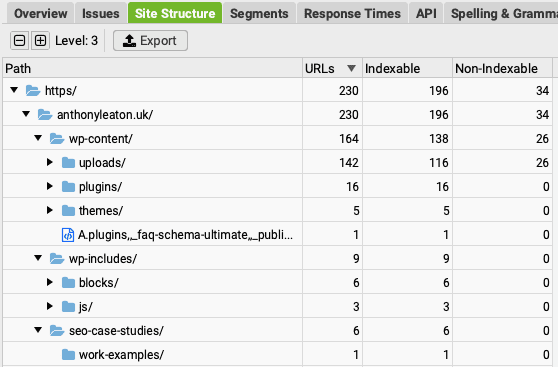
- Crawl Your Website: Use SEO crawl tools or analyse your website’s navigation structure.
- Visualise the Structure: Create a visual representation (e.g., sitemap) showing how pages connect. Screaming Frog and WebSite Auditor provide very good visualisations – although I prefer the latter!
- Analyse Click Depth: Identify the number of clicks required to reach important pages from the homepage.
Most SEOers generally agree that the best practice is to keep the click depth for important pages, such as cornerstone content and high-priority landing pages, to 3-4 clicks maximum from the homepage. We will come on to the 3-4 maximum from the homepage ‘best practice below’.
This is because:
- Improved Indexing and Visibility: Pages with a shallow click depth are more easily and frequently crawled by search engines, leading to faster indexing and better visibility in search results
- Better User Experience: A shallow click depth facilitates a user-friendly experience, allowing visitors to find relevant content quickly. This enhances user engagement and reduces the likelihood of users abandoning the website due to navigation difficulties
- Google’s Recommendations: In an old Google Webmaster Central hangout, John Mueller stated that Google places importance on how easy it is to navigate to content on a website. He indicated that Google gives more weight to pages that are one click away from the homepage, compared to pages that are two or more clicks away. But, Google itself has not provided a definitive statement on the ideal website structure or click depth. However, the search results indicate that SEO experts generally recommend keeping the click depth for important pages to a maximum of 3-4 clicks from the homepage, as this aligns with Google’s emphasis on the ease of navigating to content
Regarding flat vs. deeper website structures, a consensus is that a balance is needed:
- Flat Websites: All important pages are a few clicks away from the homepage. Good for small websites with simple content organisation. While a completely flat website structure (with all pages linked directly from the homepage) can be beneficial for crawlability, it may not be the most practical or user-friendly approach, especially for larger websites.
- Deeper Websites: Deeper website structures with more levels of hierarchy can be effective, but it’s important to ensure that important pages are still within the 3-4 click depth range from the homepage. Content is categorised into multiple subdirectories. Suitable for larger websites with complex content organisation.
John Mueller From Google on Good Site Hierarchy:
- Intuitive Navigation: Users should be able to find what they need with minimal effort.
- Logical Content Grouping: Related content should be grouped under relevant categories.
- Flat vs. Deep Structure: Balance the need for clear categorization with ease of crawling (more on this later).
Anthony’s Guide to Crawlability Best Practices:
Do’s:
- Maintain a clear and consistent hierarchy.
- Use descriptive category and sub-category names.
- Implement a user-friendly navigation menu.
- Create a comprehensive XML sitemap and submit it to search engines.
- Interlink relevant pages within your website.
- Avoid orphan pages (pages with no internal links). If in doubt use or create a HTML sitemap.
- Think Purpose – pillar and cluster pages – use HubSpot Methodology
Don’ts:
- Have an excessively deep hierarchy (too many clicks to reach important pages).
- Use illogical or irrelevant category names, i.e: don’t let the intern doing the blogging to decide your fate!
- Do not Block essential files (CSS, Javascript) in robots.txt.
- Do not create duplicate content across different URLs, or if you do, do not make the duplicate pages with canonisation. Also, make sure these pages are no-indexed. Also, do not create subdirectories off of duplicated content that is no-indexed. Sure it can get indexed but it sends mixed signals to search engines.
- Do not have broken internal links.
Remember:
- A well-structured website with a logical hierarchy improves user experience and search engine crawling efficiency.
- There’s no one-size-fits-all approach. Choose a structure that balances user navigation with content organization based on your website’s size and complexity.
- Prioritise a flat structure for smaller websites and consider a deeper structure for larger websites with a significant amount of content.
How To Spot and Deal with Duplicate Content in a Technical Website Audit
Duplicate content, where significant portions of content appear on multiple URLs, can confuse search engines and harm your SEO.
Typically, Google search console will alarm you to content it thinks is duplicated and it typically choses another canonical URL.
Your first stop and alarm system is typically Google Search Console. SEMrush, Ahrefs, and Screaming Frog can help you identify and fix duplicate content issues too:
1. Screaming Frog:
- Crawl Your Website: Start by crawling your entire website using Screaming Frog’s SEO Spider tool. I recommend using ‘Google Mobile’ as the crawler and reduce the amount of seconds it takes to do each retrieval. This eradicates your server throwing out negative information of a server error. Also, any page rejected by a server error typically is not scanned and therefore cannot be seen as a duplicated page!
- “Duplicate Content” Filter: Once the crawl is complete, navigate to the “Content” tab. Here, you’ll find filters for “Exact Duplicates” and “Near Duplicates.”
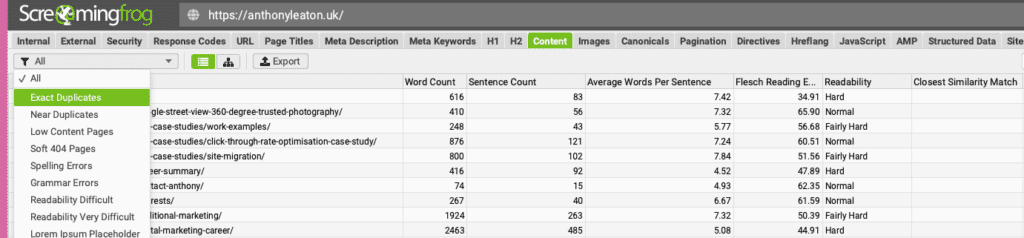
- Exact Duplicates: This filter shows URLs with identical content. Analyze these instances and decide which URL to keep (canonical URL). You can then use 301 redirects to point duplicates to the chosen canonical URL.
- Near Duplicates: This filter identifies pages with a high degree of similarity (adjustable threshold). These might be product variations or blog posts with similar introductions. Manually review these and determine if they need consolidation, canonicalisation, or content variation.
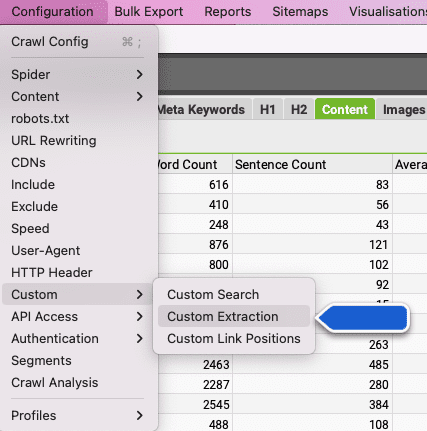
- “Extraction” Custom Filter (Advanced): For advanced users, Screaming Frog allows creating custom filters using XPath expressions. This can help identify duplicate content based on specific elements like titles, headers, or product descriptions.
2. SEMrush Site Audit:
- Run a Site Audit: Navigate to the Site Audit section within SEMrush and start a crawl of your website.
- “Duplicate Content” Issues: After the crawl, check the “Issues” section for “Duplicate Content” flagged pages. SEMrush identifies duplicates based on a similarity threshold (usually around 85%).
- Analyse Results: The report provides details on each duplicate instance, including the URLs and a “Why and How to Fix It” section with recommendations (e.g., 301 redirects, canonical tags).
- Limitations: SEMrush might miss some nuanced duplicate content cases compared to manual review.
3. Ahrefs Site Audit:
- Ahrefs Audit Tool: Similar to SEMrush, Ahrefs offers a Site Audit tool. Run a crawl of your website to identify potential SEO issues.
- “Duplicate Content” Report: Within the audit report, look for the “Duplicate Content” section. Ahrefs highlights URLs with high content similarity and provides suggestions for fixing the issue.
- Advanced Features: Ahrefs might offer additional features like identifying pages with similar titles or meta descriptions, potentially indicating duplicate content issues.
How To Deal with Duplicated Content or Multiple URLs with Similar Content in SEO
There are several approaches to dealing with multiple versions of URLs with content duplication, depending on the specific situation and your website’s needs.
Here’s a breakdown of common scenarios and solutions I have come across.
1. Identical Content, Different URLs:
- This is the most straightforward case. You want search engines to recognize one URL as the “canonical” version and consolidate their ranking power.
- Solution: Implement a 301 redirect. This permanently redirects users and search engines from the duplicate URL to the preferred (canonical) URL. This ensures search engine authority isn’t diluted across multiple URLs.
2. Near-Duplicate Content, Different URLs (e.g., product variations, blog posts with similar introductions):
- Here, the content might be very similar but have slight variations. You might want these variations to exist for user experience reasons.
- Solution 1: Canonical Tag: Add a rel=”canonical” link tag to the duplicate page, specifying the canonical URL. This tells search engines to consider the linked URL as the primary version for ranking purposes. Note: Canonicals can still be ignored by a search engine and the duplicated page can still be favoured. There are two solutions, a 301 to the correct page from the duplicated one, or a non-index on the duplicated page.
- Solution 2: Content Variation: If the variations are valuable (e.g., product colours), consider enriching the content on each page with unique details to avoid near-duplicate penalties. Remember this does start to spread out authority of each page and through this the ranking possibility of an individual ‘colour’ product to rank. Looking at Amazon and other large retailers, it is best to carry all the variations on one page.
3. Paginated Content (e.g., blog post split across multiple pages):
- Search engines might treat each paginated page as a separate piece of content.
- Solution 1: rel=”next” & rel=”prev” Tags: Implement these link tags on each paginated page to indicate the relationship between them. This helps search engines understand the pagination structure and properly index the content as a whole.
- Solution 2: Canonical Tag on Subsequent Pages: Consider using a canonical tag on all pages after the first, pointing to the first page in the series. This can help consolidate ranking power for the entire content piece.
- From experience, if the article is in two seperate ‘chunks’, typically there is a new flow and new SEO opportunities to have. I suggest if you have to cut an article its best to rename the second to something more advanced with different long tail dynamics. You can also use Pagination: Implement rel=”next/prev” or canonical tags on subsequent pages.
4. Dynamic URLs (URLs with parameters):
- The best solution depends on the specific scenario. Here are some of the recommendations from Google to minimise the negative SEO effects of URL parameters and what I have found out through practice. These URLs can lead to BAD duplicate content issues if the parameters don’t significantly alter the content.
- Solution 1: Parameter Handling in Search Console: Google Search Console offers a Parameter Handling tool where you can specify how search engines should treat URLs with specific parameters (e.g., ignore, consolidate). Keep URLs clean: If possible, remove unnecessary URL parameters.
- Solution 2: Canonical Tag with Base URL: For dynamic URLs with significant variations, use a canonical tag pointing to a base URL without parameters.
- Remember do not have parameter URLS in sitemaps. It creates a world of pain to remove them and you can use 301 redirects: Redirect URLs with parameters to the corresponding canonical URL. Plus, use cookies: Consider using cookies to store tracking information instead of including it in the URL.
On Page Optimisation Audit
This deserves to be covered in another article. I will go over the basics of what you should be looking at and why. User intent reigns supreme: Prioritise content, structure and elements that fulfils user needs while optimising for search engines. The content should resonate with the reader – always keep that in mind.
1. Title Tags in Technical SEO
- Conciseness is key: Aim for 50-60 characters to avoid truncation in SERPs. You should be considering using pixel length over characters. The choice to keep it smaller all depends on the strategy you are adopting and the goal of the page. If you optimising pages in a crowded and highly competitive space, consider using long tail keywords (see below) which go over 60+ characters.
- Target the primary keyword: Include it naturally, avoiding keyword stuffing – or better put it looking make for search engines and not people
- Brand it up: Incorporate your brand name strategically, especially for established businesses.
- Write for clicks: Craft a compelling title that entices users to click.
USING LONG TAIL KEYWORDS IN A TITLE - While high-volume keywords might seem tempting, competition can be fierce. Long-tail keywords, more specific phrases with lower search volume, offer a strategic advantage:
Lower competition: You’re more likely to rank higher for long-tail keywords.
Higher conversion rates: Users searching for long-tail keywords often have a clearer purchase intent.
Inform content creation: Long-tail keywords can guide your content strategy by revealing user search queries. - Embrace Long-Tail Keywords by:
Researching user intent: Understand the “why” behind user searches is it navigational, transactional, informational etc.
Optimising for relevant long-tail terms: Incorporate them naturally throughout your content.
Creating targeted landing pages: Match long-tail keywords with specific pages addressing user needs.
2. Optimising Meta Descriptions in a Technical SEO Audit
- Entice, don’t mislead: Briefly summarise the webpage’s content and value proposition. A meta description does not need to have the keywords, however the keywords in the meta description will be highlighted in the SERPS. Google can replace your meta description, like your title with something it believes is more relevant.
- Optimise length: Aim for around 155-160 characters for ideal display in SERPs. I say 120 to 130 as mobile search results are shorter and likely 50% of your first ever customers will come via mobile search.
- Include a call to action: Encourage users to click through, use terms like ‘discover’ ‘find out’ – create intrigue. Do not use ‘click here’ 😀
3. Optimising Header Tags: Show Your Page’s Structure
- Clear hierarchy is crucial: Use H1 for the main title, H2s for subheadings, and H3s for further breakdown.
- Integrate keywords: Include relevant keywords naturally within headings.
- Structure for scannability: Headings improve readability and user experience.
4. Optimising Images: More Than Just Eye Candy
- Optimise file size: Reduce image size for faster loading times.
- Descriptive file names & Alt-Tags: Use keywords to describe the image content especially in the Alt-text. The alt-text SEO technique has a low performance – however, once adding images to an image sitemap has longer term benefits from turning up in image searches as well as Knowledge Graph.
5. Internal Linking – Clustering Your Content
- Link strategically: Connect relevant pages on your website to create a strong information architecture using internal linking.
- Use relevant anchor text: The text used to link should be descriptive and keyword-rich. It should provide the ‘reason’ to click through. Do not use ‘click here’ as the call to action or internal link.
Rich Snippet Schema: Signal in a Search Engine’s Language
Rich snippets are the information boxes you see in SERPs, often displaying ratings, prices, how to or event details. By implementing schema markup, a type of code, you can provide search engines with richer information about your content, potentially increasing your chances of landing a rich snippet.
Benefits of Rich Snippets:
- Enhanced visibility: Stand out from the crowd in SERPs and perhaps get placed in Knowledge Graph too.
- Improved click-through rates: Entice users with informative snippets.
- Increased website traffic: Attract more qualified leads.
Explore Rich Snippet Schema for:
- Products: Highlight prices, availability, and reviews.
- How To + FAQs: Demonstrate knowledge of solving customer problems and frequent questions
- Recipes: Showcase cooking times, ingredients, and ratings.
- Events: Display dates, locations, and descriptions. Excellent for local SEO
- Jobs: This schema needs to be used with caution as soon as the job is down, remove it. Failure to can result in manual actions.
- Video: Using video on page, with correct mark up improves the page’s ranking with the chance of getting the video into the SERPS.
Broken Links, Redirects and Mobile Friendliness
- Screaming Frog: This SEO spider crawls your website, identifying broken links (4XX errors) and redirects. Search console and Bing Webmaster tools should pick up the majority. Remember Screaming Frog is a scraping tool, it is always best to compare and run a manual test on 10% of the results. Any false positives, should signal to do another scan over a longer period of time or look at the server logs.
- Fix Broken Links: Update internal links or remove them. For external links, notify the website owner.
- Optimise Redirects: Use 301 redirects for permanent URL changes. Avoid redirect chains as they can slow down loading times. You will find that internal links pointing to a redirected page will need to point to the new page. I find that although it should not make a difference to Google with a 301. Remember a 301 does ADD TIME TO SITE PAGE RENDERING with re-directs!
2. Mobile-Friendliness: The Mobile-First Mindset
- Screaming Frog: Crawl your site and check the “Mobile-Friendliness” report.
- Google Mobile-Friendly Test: Run the URL through this free tool (https://developers.google.com/search/blog/2016/05/a-new-mobile-friendly-testing-tool) for a mobile-friendliness verdict.
- Prioritise Mobile Optimisation: Ensure your website renders flawlessly on all devices, especially mobiles.
3. Page Speed: Delivering Lightning-Fast Performance
- Screaming Frog: The “Page Speed” report provides basic insights like response times and page size.
- Google PageSpeed Insights API: Integrate Screaming Frog with the API (https://www.screamingfrog.co.uk/learn-seo/page-speed/) to gather more comprehensive PageSpeed Insights data for multiple URLs at once.
- Lab vs. Field Data: PageSpeed Insights offers both lab data (simulated environment) and field data (real-world data from Chrome users). While lab data provides a quick snapshot, field data gives a more accurate picture of actual user experience.
4. Structured Data Implementation: Speaking Search Engine’s Language
- Screaming Frog: The “Search Console” report can highlight missing structured data markup. However, it won’t show you the specific schema used.
- Google Search Console: Use the “Rich Results” section to see which pages have implemented structured data and if there are any errors. Typically they show you why, but I have still found errors inside how Google interpret this data. Always resubmit the page for indexing. The Google API ranking leak suggested that it takes up to 30 changes on a page to get it ‘re-categorised’. So expect it to take a little time!
- Rich Results Test: Validate your structured data implementation using Google’s Rich Results Test (https://developers.google.com/search/docs/appearance/structured-data).
Web Dev Tools for Real-World Speed Checks
- Chrome DevTools: Open any webpage in Chrome and right-click anywhere. Select “Inspect” to access DevTools. Navigate to the “Network” tab to see detailed page load information, including load times for individual resources.
Technical SEO and Server Log Analysis
While on-page optimisation and backlink acquisition remain fundamental strategies, a frequently under-utilised yet potent tool exists: server log analysis. Server log files, are recording every interaction with your website. They offer a wealth of invaluable data.
Let’s get one thing right – I distrust scraping and cloud based SEO tools – period. They often give SEO professionals a ‘way of working’ that is actually – a way of doing what the tool maker says. I have written about this elsewhere. I really like Screaming Frog, as literally you can do almost everything – but you have to Google the answer. You can ask them straight. Their main problem is that many website servers do not like the way it crawls and, SEO is almost always on a deadline 😀
By looking at server logs, SEO professionals can gain a granular understanding of crawl activity, identify potential roadblocks, and ultimately optimise their website’s health for superior search engine visibility. This final section delves into the power of server log analysis and why it is useful.
Some demystification is needed. If you have a website over 10,000 pages long you will have issues with crawl activity. Actually Google have said in various channels it is more like 1M. For me the real issue isn’t crawl, it’s indexation!
- Crawl Activity: Understand how search engines (primarily Googlebot) crawl your website. This includes frequency, crawl depth, and specific pages accessed.
- Error Identification: Identify crawl errors (4XX and 5XX status codes) that might hinder search engine indexing.
- Uncovering Hidden Issues: Discover orphaned pages (not linked to from anywhere on your site), potential redirects issues, and even crawl budget waste.
Beyond the Basics: Using Screaming Frog + Others with the Data
While not a full-fledged log analyser, Screaming Frog provides a solid foundation for initial log exploration:
- Upload & Filtering: Upload your log file and filter entries by date, status code, user agent (focusing on Googlebot), and URL.
- Error Identification: Quickly identify crawl errors (4XX and 5XX status codes) for further investigation.
- Status Code Analysis: Gain insights into the distribution of status codes across your website, helping you pinpoint potential issues like soft 404s.
While screaming Frog is a fantastic starting point for basic log file analysis, a wider arsenal exists for the discerning SEO professional:
- Log File Analysis Tools:
- Logalyze: A comprehensive platform offering in-depth analysis, visualisation tools, and customisable reports for advanced SEO specialists.(https://logalyze.org/)
- OnCrawl: Provides a user-friendly interface for analysing crawl data, including crawl depth, errors, and bot activity.(https://www.oncrawl.com/)
- Botify: Offers advanced features like crawl budget optimisation suggestions and bot footprint analysis.(https://www.botify.com/)
- Chrome DevTools: Don’t underestimate the power of browser developer tools! Use the “Network” tab to analyse individual page load times and identify resource bottlenecks that might be impacting crawlability.
Beyond the Tools: The SEO Expert’s Touch
Remember, tools are just that – tools. Your SEO expertise plays a crucial role in interpreting the data:
- Correlate Errors with Specific Pages: Identify specific pages with recurring crawl errors and prioritise fixing them.
- Investigate Orphaned Pages: Uncover orphaned pages that might be valuable content and determine if they should be linked to, or removed. Using a simple HTML sitemap (as a webpage) is an old school way of removing orphaned pages.
- Monitor Crawl Budget: Analyse crawl activity to identify potential crawl budget waste and optimise your site structure for efficient crawling.
Core Web Vitals in a Technical SEO Audit: Optimising for Speed and User Experience
Core Web Vitals are a bunch of metrics that measure a website’s loading speed, interactivity, and visual stability. These factors directly impact user experience (UX) and have become a significant ranking factor in Google’s search algorithms. I recommend using Screaming Frog, and attaching Search Console and Page Insights (API). From this you will get a good idea what to prioritise.
Here’s what to look for in a technical SEO audit for Core Web Vitals and how to optimise for them:
Largest Contentful Paint (LCP): This measures how long it takes for the largest text block or image to load on a page. Ideally, LCP should be less than 2.5 seconds.
- What to look for in an audit:
- Large image files or unoptimised media slowing down load times.
- Render-blocking JavaScript or CSS files delaying content rendering.
- Server-side rendering issues causing slow first-byte time.
- Optimisation Strategies:
- Leverage lazy loading for images below the fold.
- Optimise image sizes and formats (e.g., JPEG for photos, WebP for graphics).
- Minify and defer non-critical CSS and JavaScript files.
- Consider server-side caching to improve first-byte time.
Interaction to Next Paint (INP). This measures the time it takes for the page to visually respond to a user’s first interaction, such as a click or tap. A low INP indicates a smooth and responsive user experience.
- What to look for in an audit:
- Similar factors as FID, such as large JavaScript files or excessive DOM manipulation.
- If your website has a web-basket that has all of its contents visible to the user expect a poor result.
- Optimisation Strategies:
- Implement the optimisation strategies mentioned for FID.
- Consider techniques like code splitting and preloading critical resources to improve initial response time.
Cumulative Layout Shift (CLS): This measures the unexpected layout shifts of content elements while the page is loading. Ideally, CLS should be less than 0.1.
- What to look for in an audit:
- Images without set dimensions causing layout shifts.
- Ads or embedded content with dynamic sizes disrupting layout.
- Use of CSS animations or transitions without proper calculations for layout stability.
- Optimisation Strategies:
- Set dimensions for all images and iframes beforehand.
- Reserve space for ads and embedded content using aspect ratios or pre-defined sizes.
- Use CSS
widthandheightproperties with caution for animations and transitions.
Tools for Core Web Vitals Optimisation:
- Google PageSpeed Insights: https://developers.google.com/speed/docs/insights/v5/about
- Lighthouse (Chrome DevTools): https://chromewebstore.google.com/detail/lighthouse/blipmdconlkpinefehnmjammfjpmpbjk?hl=en
- WebPageTest: https://www.webpagetest.org/tips
Conclusion
This comprehensive guide to technical SEO audits offers valuable takeaways for SEO professionals. It is by no-means complete, but it offers a great place to start for a more in-depth view of Technical SEO audits. Here are the key points I touched on.
- Focus on Crawlability and Indexability: Ensure search engines can easily access and understand your website’s content. Check robots.txt directives, fix crawl errors (server errors, 404s, etc.), and submit a well-structured XML sitemap.
- Prioritise User Experience: A well-structured website with clear hierarchy and descriptive URLs improves user experience and search engine ranking.
- Identify and Address Duplicate Content: Duplicate content confuses search engines and harms SEO. Use 301 redirects or canonical tags to consolidate authority on the preferred version.
- Optimise On-Page Elements: Title tags, meta descriptions, header tags, and image optimisation all play a role in effective SEO. Keep titles concise and informative, write compelling meta descriptions, and use relevant keywords naturally.
- Internal Linking and Information Architecture: Strategically link relevant pages to create a strong information architecture. Use descriptive anchor text to guide users and search engines.
- Mobile-Friendliness is Crucial: Ensure your website is mobile-friendly for optimal user experience and search engine ranking. Test and improve your website’s loading speed for both desktop and mobile devices. Improve your core web vitals performance.
- Focus on User Intent: Content should prioritize user needs while optimizing for search engines. Understand the “why” behind user searches (informational, transactional, etc.) and tailor content accordingly.
- Long-Tail Keywords: Consider using long-tail keywords for lower competition and higher conversion rates. Research user intent and optimize content for relevant long-tail terms.
- Image Optimisation: While alt text has a lower SEO impact, adding images to an image sitemap can benefit long-term image search ranking.
- Rich Snippet Schema: Implement schema markup to provide richer information about your content, potentially increasing your chances of landing a rich snippet and improving click-through rates.

- AI in SEO: Maximising Your Online Visibility - 21 October 2025
- Effective SEO Reindexing Techniques: A Guide - 21 October 2025
- Local SEO Course Passed - 2 February 2025