

This real-life case study and how to, we examine several key factors involved in executing a massive toxic link removal and Google Disavowal process. Zoom down to the Toxic Link Removal Process below to see how the links were identified and what to do next. This real life example had a significant impact on organic traffic. I go over the tools used, and how the removal process itself was performed. Also I cover the removal of manual action and the results which I saw with the traffic uplift.
With the toxic links, I show the steps taken to identify them, categorise them, and then reach out to the website owners to request the removal of the links. You might have to make some politically correct decisions and keep some toxic links as they are personally known to people within the business you work in. My advice is, basically chop all the really bad wood and if there are still some bad links, try a disavow first and then move to plan b.
The blog starts with a generic introduction to Manual actions, history and various thoughts which I read and continue to come across.
Background: How a Google manual action affects organic traffic
The primary goal of the disavow process in this scenario was to recover from a Google manual action caused by spammy links from a hacked subdomain. The ultimate result was a significant increase in organic traffic, which doubled after a year of effort. This outcome aligns with Ahrefs findings, which conducted an experiment by removing and then reavowing links to see the impact on rankings and traffic.
Ahrefs back in 2021 observed a decrease in traffic when links were disavowed and an increase when the disavow file was removed, confirming that links play a crucial role in search rankings. The experiment conducted by Ahrefs shows that when links are disavowed, search engines can no longer trust the authority of the website, leading to a decrease in organic traffic. However, when links are reavowed, search engines regain their trust in the website and traffic increases accordingly.
Although dated by a lot of naysayers in 2021 onwards, disavowing significant toxic links with manipulative keyword profiles (similar to your product) does, in my experience have a positive effect on a domain’s organic traffic and performance.
From my experience, Google does not ignore all bad link profiles. It does not have the resources to check if a website has been hacked and link spamming although it does appear to have grown its out going links.
For me this creates a dilemma, the link’s power is diminished from the backlink site as there are a lot of links outgoing from it, however it is not seen as malicious, more that it looks like your website might have paid for the link.
Tools and Methods Used For Toxic Link Removal
A number of tools were used to identify and analyze problematic links in the case study. Ahrefs and the excellent Link Assistant’s SpyGlass was used to locate all inbound links, while Screaming Frog and Website Auditor helped identify which pages suspected of receiving spam links.
Bartosz Góralewicz emphasizes the importance of using the right tools for link removal and the creativity involved in the process in his guide, which emphasizes the importance of a comprehensive approach for a toxic and back backlink thorough cleanup.
Although Góralewicz study is dated in 2020, many of the bad link directories and stand alone, abandoned websites – dating back early 1990’s are still very much alive, and in many cases are quite potent for black hat SEO malware attacks. You will find that many webmasters left their websites abandoned, typically WordPress, which have been compromised.
These websites contain WP malware and continually spam domains that have been hacked at one time in their life with spam links. In other words, the longer you leave a bad backlink profile which has been subject to a malware attack – the longer the process will take.
The process of removing links should also ensure that no valuable links are lost in the process. To do this, you can manually check each link and verify that it is not from a reputable source before removing it.
Advice from John Mueller, to me About Disavowed Links and Domains
Speaking personally with John Mueller from Google I asked, what happens if a domain was once spammy and the new owner has cleaned up the act, should one remove the domain from the disavow. His answer was, only if the domain itself is hurting by it not being there. This is an interesting comment – ultimately, what I feel is meant here is, if a domain which was an authority on your market was hit by spam link hosting malware, then yes – your website would have felt the negative effect of losing a great link before the disavow. It is not that the domain has a good link profile, but might not be relevant, and you switch it back on.
CASE STUDY: Toxic Link Removal Process
There were multiple steps involved in identifying spammy links using the tools outlined above.
Using Ahrefs, WebCEO and Link Assistant, I saw which domains these tools ‘thought’ were most toxic. There are quite a few false positives typically found in ‘certain fan niche’ websites which make a lot of outgoing links versus incoming.
STAGE 1: HOW TO IDENTIFY AND CLASSIFY TOXIC LINKS
First stage is look at referrals, and referral traffic. And cross link this to your top toxic links. A simple way to look at bad links per se, is the amount of referral traffic they send, and what type of traffic (is it just bots). If so, I would make a list of these sites as it is highly likely negative or malicious SEO.
- In Ahrefs, look at Domain Rating (DR) and URL Rating (UR): Look for referring domains with low DR (e.g. under 20) and URLs with low UR, as these are likely low-quality, spammy sites that could be considered toxic. Prioritise removing links from the lowest DR/UR domains first. Then look to how much traffic they are sending, if any, and bounce rate, time on site etc. Typically it’s next to zero or could just be bot traffic. Sites sending a lot of bounce-rate bots will affect your website with pogoing your rankings.
- Anchor Text: I examined the anchor text used in the backlinks. If you see a high percentage of exact-match anchor text for keywords you’re trying to rank for, or keywords which are totally irrelevant, but with a page which has branded or top keywords for your website listed, this could indicate unnatural, manipulative link building and toxic links. Use Excel to sort the backlinks by word and domain. Use a pivot table for best effect here. You ought to see a trend of low quality domain, low time on site and very similar keywords.
- Referring Domains + Anchor Text: Sort the backlink report by referring domains and look for patterns of low-quality, irrelevant, or suspicious-looking sites linking to you. These are the domains you’ll want to prioritise for outreach and removal.
- Pay Attention To The Backlinking Site Directories. You might find there is a common thread of the directory name, or type, across many websites. This suggests malicious activity and likely a hacked website.
- Link Text in Context: Manually review the context of backlinks, looking for signs they were created solely for SEO purposes rather than natural editorial links. In this case, my task was split between native speakers to investigate each website to see if the links on German, French, Italian and Spanish portals were real links or not. As there were many sites which were hacked, the research moved from personal PCs to an isolated PC just fit for browsing.
- Pay attention to things like links in the footer, sidebar, or low-quality content. All these are red flags. A lot of low quality and hacked websites use ‘scraped’ content. A lot of the content makes no-sense and I imagine the ‘black hat SEO or hacker’ was using content mashing tools from ‘Black Widow’.
- Certain tools and domain names will tell you if its a directory which makes decisions from the client which ones to remove easier. For the team I asked if there was anything saying ‘free or paid link’ is a sure fire win at innocent old school link practices (let’s say set up pre-2011 and had not been hit by Google’s Panda Update). Anything after would be treated more seriously as it could only be malicious.
IMPORTANT ADVICE - Visit the websites to see their general state of repair and when they were last updated. Make a note of this in your database / Excel.
- Make a list of contacts for all domains (whois or any report spam email addresses in their privacy policy), or a webpage to contact the domain during the pre-outreach stage.
MANUAL ACTION TOXIC LINK CLASS TYPES
After identifying the domains, and the toxic link class types, I made a priority list and submitted to the client. There were around 1000 domains with over 500,000 toxic links of all severity types. I found that 80% of the types were WordPress compromised websites which were hacked or exploited in some way. I had to scale the outreach and protocol for each type of site and backlink profile.
The toxic link class types to be disavowed fell into these categories
- Hacked websites with newly created spam blog posts. These had URLS with random characters and sometimes keywords tagged on the end. However, the directory in the URL typically fell into 3-4 similar categories making them easy to spot. Post outreach, these sites were WordPress compromised websites with hacked central databases. Around 30% of the webmasters who responded were not aware of this activity.
- Hacked websites main pages with spam footer content (before it was devalued by Google as a link). This was another form of attack. Most of these websites were abandoned WordPress websites that had likely used an out-dated plugin that was exploited. We submitted to the client various lists of ‘Industry Related’ to ‘Malicious’ to the client.
- Link Directories and Wikis. The majority of these were free to list web portals and likely used by a previous SEO company or company intern doing ‘link building’. The approach here was to tell them to remove the link. If they asked for a free to remove it (most did), then they would be disavowed / spam reported for breaking Google’s Webmaster Guidelines for paid for / manipulated links.
- Hosting Your Website Images: There were websites offering our clients copyrighted images on their own website to be used in articles by bloggers who do not host images on their website. It became an issue over time as images are calling to your server, plus they are using copyrighted material.
- Main Site Post Spam. This was a small percentage of WordPress websites which had normal text but linked to the client’s site. Post outreach, the webmasters were unaware of the activity or how the content appeared. Liaison with the webmasters found it was an exploited plug-in that removed (by trial and error) or updated resolved it.
- Industry Related, Friends and Fans – but with a spammer profile. We found that some partners and clients had a really bad backlink profile, but in terms of public relations, we had to come back to these (plentiful) domains as a last resort – and also informing the client CEO. If it was in industry related or from a partner website (with footer links – follow on every page :)) we flagged these up for personalised email to a named contact. Post disavow, we did not need to contact these ‘special’ cases.
CLIENT DECISION & TOXIC LINK OUTREACH
The first few batches had little client input as it was obvious that the sites were hacked or malicious. It was decided that Hacked Websites and Link Directories and Wikis were the most damaging and should be tacked in the first round. The WordPress main page spam was annoying, but the domain authority scores were typically early 20’s to thirty.
Industry Related, friends and fans were to be left to last as we were counting that Google would recognise the majority of bad links were malicious.
Image reusing websites were low quality, but there was no-over use of keyword spamming used with the pictures. This was left for another time.
Toxic Link Domain Outreach and Manual Action Protocol
From the above we identified 4 main ‘link types’. I drafted and created four emails / posts and processes to webmasters detailing why the domain was being contacted, examples of the spammy links and Google’s Webmaster Guidelines for linking. Each email was insistent that a disavow would happen before a certain date. For the amount of out-reach it was important to scale it within time. I agreed with the client that we would contact a domain 4 times over a period of 6 weeks.
If a domain was not contactable (email failed to work, there was no way to contact the webmaster, then they would be disavowed straightaway. Those refusing to remove the links or asking for payment, a disavow. A website fixing itself or removing the link would not be disavowed. Here is how I marked up the disavow.
How To Mark Up A Google Disavow For Toxic Links
Doing a disavow has repercussions. Google openly state it can affect your website. Having a solid case and doing the groundwork which I did before presenting the domains and what ‘class’ of activity they had against the client’s website and what the tools, plus what we saw with a site visit, all bought due diligence to the fore. Do NOT disavow relying solely on tools. I highly recommend that you visit the website and classify it by type. Also, visit the main domain outside the links pointing to your domain to verify a site has been manipulated or ‘hijacked’.
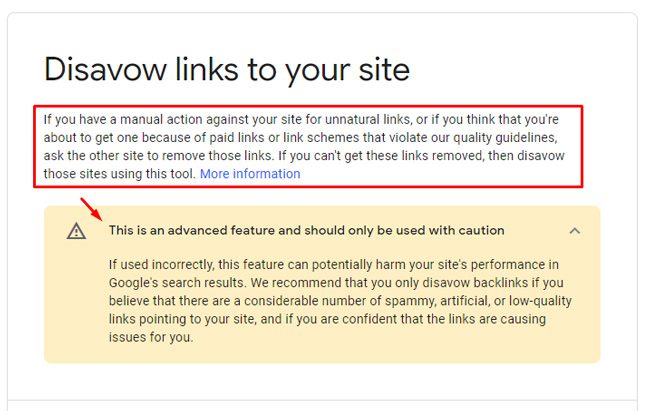
Follow these steps to mark up Google disavow files correctly and add comments.
- Disavow Your Domains or Pages in a Text File: Create a text file containing your disavowal list. The text file must be encoded in UTF-8 and the file name must end in .txt. I recommend using UTF-8 only. You may have to use an advanced WordPad to get the correct format.
- It is not possible to disavow a subpath, such as example.com/en/, but you can disavow a domain (or subdomain), such as domain:example.com.
- You can add on specific links to disavow, but I recommend you do it at the domain level and use some links as examples in the comments section.
- Add Comments: You can include comments by starting a line with a # mark – which I recommend, not only for you the disavower to remember what was done, but when it was done and more importantly why. Any lines that begin with # will be ignored by Google. For example:# This is a comment http://spam.example.com/stuff/comments.html domain:example.com. This is how it will look in the disavow

- In the disavow links tool, select the property, and upload the list. If the file has any errors, you will see a list of errors immediately. Your old list will not be replaced. You can fix your new list and upload it again.
- You can replace an old list with a new one by uploading the new one. Uploading a new list for a property replaces any existing list for that property immediately. The old list will be removed from the system and the new list will take effect immediately. All existing saved searches and automated searches will remain unchanged.
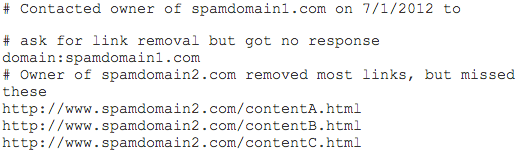
- For each toxic link category we had a start and end date point. In the Disavow, they were easy to classify using # and commenting what type of toxic link it was and how to spot it.
- Here is something I actually wrote:
# 30/04/20 Where possible we contacted the official administrator of the domains four times. Others were contacted via online contact forms. Some forms did not work suggesting the sites were not being maintained. Other domains were expired or compromised. All links to this domain were low quality with no relevance to the user from these websites.
- Disavow files were submitted to Google for non-respondents or when removal was not possible. This approach follows best practices for using the disavow tool, which should be used as a last resort after effort has been made to remove the links manually.
The disavow tool should only be used as a last resort when other manual removal methods have failed to work. It is important to remember that it should be used with caution. It is also essential to consider the potential consequences of disavowing links, since it can negatively impact the organic visibility of a site.
MAIN TOXIC LINK REMOVAL + MANUAL ACTION CASE STUDY FINDINGS
From the outreach around 80% were not responding from the top 3 priority categories. Most had no webmaster contact details made public making contact impossible. Their hosting companies were un-interested in their customer’s domain well being, which was a little depressing and so these had to pass to direct disavow as there was no way to contact them.
80% of domains which were hacked, another 10% were websites which were using out-dated WordPress plugins. The last 10% were low quality bad international web-directories. Of these 90% wanted money from our client to remove the link. I told the team to quote the guidelines from Google on reporting spammy links and paid for links (including their removal) is not following Google’s guidelines – do they got a disavow.
Google Disavow Conclusion: Toxic Links Disavowed and Traffic Returns
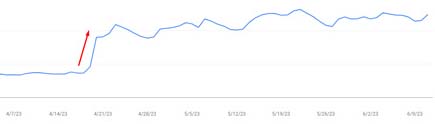
As I said at the beginning of this case study, the traffic doubled shortly, a few months, after the disavow it gained full momentum after 6 months in. The sigh of relief was when the ‘Google Manual Action’ was removed in Search Console. At that time I did not know how to spot a visit from a Quality Rater.
The case study illustrates the complexities involved in recovering from a Google manual action due to spammy links. It highlights the importance of a meticulous approach to identifying and removing or disavowing bad links, the careful use of SEO tools to aid in this process, and the potential impact on organic traffic. There is also the human element that some ‘toxic’ domains of ‘friendlies’ can be left to the last minute, and dealing first with the massively generated malware toxic links are removed.
Remember, while the disavow tool should be used cautiously, as it can have a negative effect on organic rankings, it is, at least for me, essential for the long-term success of any website. Regularly monitoring backlinks and using SEO tools can help to detect any potential issues early on and take proactive steps to mitigate them. The disavow tool if used incorrectly, means the website may be penalised by Google, resulting in a decrease in organic traffic and rankings. So, chose your web agency or employee well when considering a disavow.
Based on another study: The GSQi case study, a site owner saw improvements after removing a large disavow file, which suggests the disavow tool might not be necessary in some cases and can even hinder performance if used incorrectly. This case study illustrates the importance of understanding when and how to use the disavow tool effectively in response to a manual action from Google.