
Although the comprehensive list of SEO recommendations on Largest Contextual Paint may seem overwhelming, individuals or websites cannot implement them all without a significant budget or time investment. The confusion I have seen on both the agency and in-house side regarding lazy loading and caching is significant, as we will see later. With some organisation, these could be achieved more efficiently. Web performance professionals may find it difficult to discern which recommendations will result in the greatest positive impact on their site.
Here are my top questions for search engine optimisation, and optimising for Largest Contextual Paint in Core Web Vitals.
How likely is it that most developers will be able to implement these soon?
In real-world terms, what impact do they have?
All websites can benefit from them due to their universal relevance and applicability (big hint: thus you can look to case studies)?
Largest Contentful Paint (LCP), Statistics the Challenge for SEO professionals
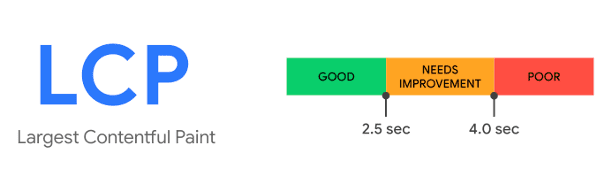
Among the three Core Web Vitals metrics, 54% of sites meet the 2.5 second minimum, while 1.5 seconds is ideal for top ranking.
There are many factors to consider when determining how long it takes for an image to load.
It is also crucial to consider the time preceding the loading of images, and HTTP Archive data indicates that this is precisely where many websites struggle. The loading of images may already be too slow when a webpage must first download, parse, and process CSS or JavaScript files before loading images.
An image element with the src and srcset attributes can be used to load an image more efficiently. Data-src, a non-standard attribute that depends on JavaScript to render, typically slows down loading. Rather than using client-side rendering (CSR), SSR embeds all page markup, including the image, into the HTML source. On the other hand, CSR solutions require JavaScript to be executed before an image can be accessed.
Whether an image is embedded in an external CSS or JS file, or incorporated into the HTML source, you can embed it using the <link rel=”preload”> tag. Preload scanners may not detect images included within inline styles. While they exist in the HTML source, their discovery may be delayed by other resources loading. Simpply, this is when preloading can be beneficial. Preloading images before they’re needed ensures that they can be accessed more quickly, since the browser doesn’t need to wait for other resources to load before it can process them. This makes it ideal for responsive web design, where images may be loaded asynchronously.
The Biggest Failure of Technical SEO’s – Lazy Loading
A crucial step is to prioritize resource loading and prevent queueing behind less critical ones. This is especially true if there are lots of scripts in the <head>. The fetchpriority attribute works by ordering the resources in the browser’s request queue. The resource with the highest fetchpriority is loaded first, and the resource with the lowest fetchpriority is loaded last. This allows developers to prioritize certain resources, such as LCP images, to load before others, which can help improve the performance of their site.
A 10% percentage of pages in 2022 set loading=’lazy’. Never set loading=”lazy” on your LCP image. I see this time and time again. This deprioritizes it and delays it from loading. Defer non-critical resources whenever possible. You can either move them at the end of your document, use native lazy-loading for images or iframes, or load them asynchronously using JavaScript. The window.addEventListener(“load”, function) method lets you load a JavaScript library asynchronously.
Technical SEO Best Practice on Website Caching
Cache content so that recently-requested content can be served quickly too. 29% of HTML document requests are served from a CDN. So the resource exists. When optimizing content delivery, here are some strategies I have employed and you should too. This is where most, even seasoned Technical SEO professionals I have worked with have just implemented what they had read and not looked into the deeper, more developmental approaches.
- A technical SEO should investigate the possibility of shifting dynamic processes currently handled by your origin server to the edge, a feature supported by most modern CDNs. This can significantly enhance performance and reduce load on your origin server.
- Assess the cache duration for your content. Is it absolutely necessary to keep the content up-to-date? Could it remain outdated for a few minutes or days without issues?
- It might be possible to cache content indefinitely and then clear the cache only when you update it. You can reduce the load on your origin server by caching content for an extended period of time, which reduces the number of requests made to your origin server. Furthermore, you can reduce the amount of content cached by only caching content when it is updated, thus selectively caching content.
From what I’ve noticed, most sitemaps do not state priority or time of refresh. That should dictate your cache policy 😀

- AI in SEO: Maximising Your Online Visibility - 21 October 2025
- Effective SEO Reindexing Techniques: A Guide - 21 October 2025
- Local SEO Course Passed - 2 February 2025